

Search  for anything...

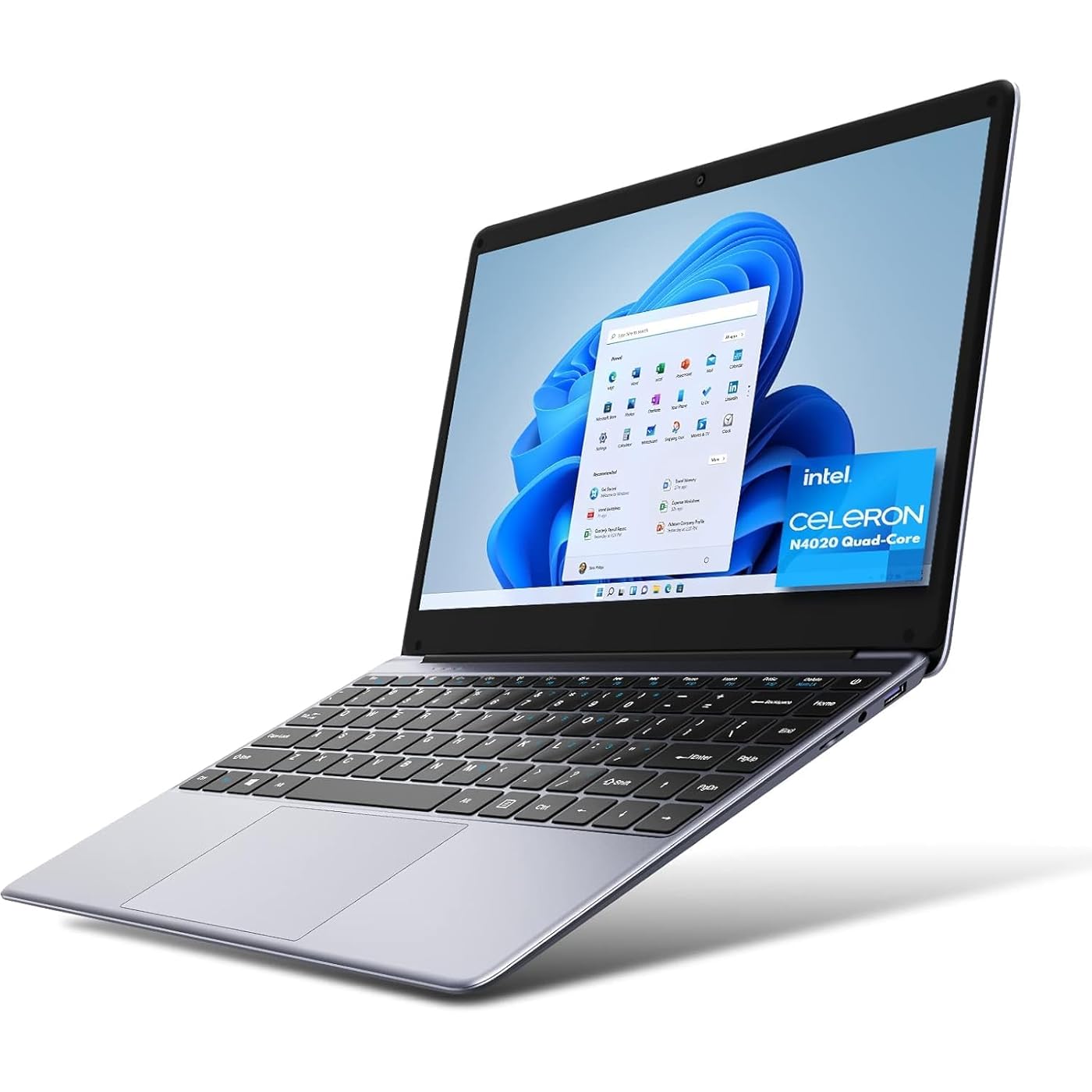
CHUWI HeroBook Pro 14.1'' Laptop, 256GB SSD 8GB RAM, Windows 11 Laptops, 2TB SSD Expand, Intel Celeron N4020(up to 2.8GHz), 2K FHD IPS Display, Ultra Slim, Mini-HDMI, 5G WiFi, USB3.0, Webcam,TF Card
  • Based on 3,744 reviews
Condition: New
Checking for the best price...
$195.89 Why this price?
Holiday Deal · 6% off was $207.58

Buy Now, Pay Later


As low as $32.65 / mo
  • – 6-month term
  • – No impact on credit
  • – Instant approval decision
  • – Secure and straightforward checkout

Ready to go? Add this product to your cart and select a plan during checkout.

Payment plans are offered through our trusted finance partners Klarna, Affirm, Afterpay, Apple Pay, and PayTomorrow. No-credit-needed leasing options through Acima may also be available at checkout.

Learn more about financing & leasing here.

Free shipping on this product
This item's return window has been extended for the holiday season: FREE refund/replacement until Jan 31, 2026

To qualify for a full refund, items must be returned in their original, unused condition. If an item is returned in a used, damaged, or materially different state, you may be granted a partial refund.

To initiate a return, please visit our Returns Center.

View our full returns policy here.


Availability: Only 10 left in stock, order soon!
Fulfilled by Amazon

Arrives Friday, Dec 26
Order within 6 hours and 40 seconds
Available payment plans shown during checkout

Protection Plan Protect Your Purchase
Checking for protection plans...

Features

  • Powerful CoreCHUWI Herobook Pro laptop is equipped with a powerful and efficient Intel Gemini Lake N4020 processor(up to 2.8 GHz), based on 14nm technology and a 5W ultra-low power design. Built-in high-performance Intel UHD graphics 600 ensures fast image processing and provides sharp image quality. Highest frequency up to 750MHz, decoding 4K video smoothly.
  • Work Smart and EfficientlyCHUWI HeroBook Pro notebook computer with 8GB RAM, and 256 GB SSD storage, make multiple applications execute seamlessly. Up to 128GB TF card expansion (not included) and a separate M.2 SSD expansion(Up to 2TB). A full-size keyboard and big trackpad make you work efficiently. Suitable for school, business, and home use. Supports 2.4G/5G dual-band WIFI, up to 867Mbps, always online.
  • Small Size, Big Rewards14.1 inch antiglare IPS screen, 1920*1080 resolution, high-definition 16:9 screen ratio provides a wider field of vision and a clearer and more comfortable visual experience. Large 38Wh lithium-ion battery, built-in fast charging technology. CHUWI thin laptop weighs only 1.3kg and is thick only 0.83 inches. Easily take this thin laptop PC and work on the go.
  • Meet Various Daily NeedsThis Windows 11 laptop is with USB 3.0*2, Microphone*1, Speaker*4, Camera, Micro-HDMI port*1, high-speed M.2*1, fast charging DC port*1, 3.5mm headphone jack*1, and TF card slot*1. Supports Bluetooth 4.2 and 2.4G/5G dual-band WIFI. Meet various using needs in your daily life.
  • One year Quality GuaranteeHeroBook Pro has Installed Windows 11 system, is out of the box, simple to use, automatic upgrade at no additional cost.

Brand: CHUWI


Model Name: HeroBook Pro Laptop


Screen Size: 14 Inches


Color: Space Gray


Hard Disk Size: 256 GB


CPU Model: Celeron N4020


Ram Memory Installed Size: 8 GB


Operating System: Windows 10


Special Feature: Anti Glare Coating, HD Audio, Memory Card Slot


Graphics Card Description: Integrated


Standing screen display size: ‎14 Inches


Screen Resolution: ‎1920 x 1080 pixels


Max Screen Resolution: ‎1920x1080 Pixels


Processor: ‎2.8 GHz celeron_n4020


RAM: ‎6 GB LPDDR4


Memory Speed: ‎2.8 GHz


Hard Drive: ‎256 GB SSD


Graphics Coprocessor: ‎Intel UHD Graphics 600


Chipset Brand: ‎Intel


Card Description: ‎Integrated


Graphics Card Ram Size: ‎8 GB


Wireless Type: ‎802.11a/b/g/n/ac, 802.11bgn, Bluetooth


Number of USB 3.0 Ports: ‎2


Average Battery Life (in hours): ‎9 Hours


Brand: ‎CHUWI


Series: ‎HeroBook Pro Laptop


Item model number: ‎Herobook Pro


Hardware Platform: ‎PC


Operating System: ‎Windows 10


Item Weight: ‎3.06 pounds


Product Dimensions: ‎13 x 0.83 x 8.4 inches


Item Dimensions LxWxH: ‎13 x 0.83 x 8.4 inches


Color: ‎Space Gray


Processor Brand: ‎Intel


Number of Processors: ‎1


Computer Memory Type: ‎DDR4 SDRAM


Flash Memory Size: ‎256 GB


Hard Drive Interface: ‎Solid State


Hard Drive Rotational Speed: ‎6000.00


Optical Drive Type: ‎No Optical Drive


Power Source: ‎Battery Powered


Voltage: ‎24 Volts


Batteries: ‎1 Lithium Ion batteries required. (included)


Date First Available: December 22, 2019


Frequently asked questions

If you place your order now, the estimated arrival date for this product is: Friday, Dec 26

Yes, absolutely! You may return this product for a full refund within 30 days of receiving it.

To initiate a return, please visit our Returns Center.

View our full returns policy here.

  • Klarna Financing
  • Affirm Pay in 4
  • Affirm Financing
  • Afterpay Financing
  • PayTomorrow Financing
  • Financing through Apple Pay
Leasing options through Acima may also be available during checkout.

Learn more about financing & leasing here.

Top Amazon Reviews

🚀 Abunda's Overview

This is our summary and key points to consider based on customer reviews.


The Chuwi HeroBook Pro is a good value laptop that has a fast startup, bright, crisp HD screen, and is generally cool to operate. However, users should be prepared to undertake Windows and Office updates, and be aware of wait times in loading content for common apps. Worth noting too is that more demanding activities like gaming or video production could be challenging on this laptop.

Pros

  • 💻 Has a 90% display that is quite good, with 8GB of RAM and a 256GB SSD.
  • 🚀 Fast startup, typically taking around 15 seconds to get to the date and time Windows log in screen.
  • 🎒 Lightweight and portable due to its slim design.
  • 💰 Offers decent performance for regular use like e-mails, messaging, Web surfing, blogging, social networking, correspondence, etc. at a reasonable price.

Cons

  • 🐌 Some users reported slow loading times for apps and long waits for content to load.
  • 💾 Requires multiple stages of Windows and Office updates after setup.
  • ⚡ The charging brick that comes with the laptop seems cheap and potentially short-lived.
  • 🔥 Apparent lack of ventilation for the laptop's electronics could cause excessive heat during intensive operations.

Should I Buy It?

If you're looking for an affordable, lightweight laptop for routine tasks like browsing, emailing, or using Office apps, the Chuwi HeroBook Pro could be a good choice. But if you require superior performance for gaming, graphics-heavy tasks, or high-speed activities, you might want to consider other options.


  • Perfect Remote Desktop
For the 8GB RAM(star of the show), sleek design, mid range to high quality display-- you cannot find a better or cheaper REMOTE DESKTOP. That's right. Other laptops in this price range do not offer this amount of RAM, with this lightweight of a device, and looking this pretty. You might be able to find one that satisfies 1 or 2 of those criteria, but not one that satisfies all 3. The Chuwi Lapbook Pro does, and this is exactly why I bought it. The camera is awful the couple times I've used zoom meetings on it, but you plug it in to your charger, you load up Chrome Remote Desktop and connect it to your Ryzen 9 desktop tower with 16GB RAM, and you're in business. You are not going to be gaming in 4k on this. This is not what it was meant to do. I've seen other reviews(I believe the international ones) saying it caught fire or something crazy-- and they were probably trying to overclock it. Although, the battery cooling is poor and it does get noticeably hot-- never had an issue with that and I don't force it to do things it isn't capable of doing. Imagine that! Battery is ok, but then again, I'm constantly using Remote Desktop, with the screen brightness on max-- if I cranked the brightness down and tried to write a research paper, I'm sure I could get the 6-8hrs Chuwi claims. But keep your laptops plugged in regardless. You're a bad purchaser if you let your battery die repeatedly, and you'll have a dead battery sooner or later on any laptop. Now for what I actually use it for: I use Chrome Remote Desktop. The 8GB ram is a must for this and I have 400mbps internet. I tried using my iPad Pro, and Google could care less about supporting that device. I've tried using laptops with 4-6GB RAM with diminishing returns. Basically unusable. I had a nice 16GB RAM Thinkpad, but it was old and massive, so I decided to look for something small and light but with a massive screen with minimal beveling on the edges of the screen. That's impossible right? WRONG! Chuwi did it with this. You're getting the form factor of a 2016-18 MacBook Pro here, for a fraction of a MacBooks price. I use Unreal Engine 4 on my main desktop in my office. I use the Chuwi downstairs or in bed because it's as light as a feather, and Remote Desktop runs absolutely flawlessly on it. I literally design video games set on max graphics on the Lapbook Pro-- thanks to Remote Desktop. You can do incredible things with this device, if you've already ponied up the money elsewhere for things that let you do incredible things. You wanna design a 4k video game on your couch and keep an eye out while your kids play Vacation Simulator in front of you? Lapbook Pro helps you achieve this. You can do it with other uglier, heavy, and bulky laptops-- but it's all about comfort and quality of life. So Remote Desktop, and a beast desktop are a must if you want to do things it was not made for. It can become your best friend if you use it like that. For gaming, I've tried mostly remote related things. PS Now, or lighter games on Xbox Game Pass. The Lapbook Pro performs as you'd expect. It's a low priced, mid-tier laptop. It's better than a notebook, it is not an ultrabook. I've already finished my History degree, but man I wish I had this when I was typing up the 16pg research papers a week before they were due. Would've made life easier. Would definitely recommend this to students. You're not gonna be cool without a MacBook, but it's as sleek as a MacBook, displays as well as a MacBook. Just runs windows instead. Also doesn't have any branding on the outer shell, so throw an apple sticker on there and fake it till you make it. ... show more
Reviewed in the United States on December 30, 2020 by D

  • Does Exactly What I Needed it To Do
Color: Space Gray
<edit> 6 month update: just after the window closed for support, like a week after the 6 months was up, it crashed. Now it's stuck in BIOS and no one can get it to work again. So I basically rented a laptop for $35 a month. Hugely disappointing. I almost got a Chromebook after I dropped my previous laptop, because I only needed to access a few websites and dictate some documents for work. I considered using the Word app for docs, But I'm so used to the Windows environment and my Office365 subscription that I was hesitant to make a switch. This laptop was extremely affordable and has been great so far (I've had it for a few months). I'm running three outboard monitors (one from the HDMI port and two others from a a USB hub and two adapters), and it handles everything I throw at it (including the occasional netflix stream on one monitor while I do some work on the other two and the laptop screen itself). I suspect it might not be a good gaming pc, but it does exactly what I needed it to do, and I'm happy with it ... show more
Reviewed in the United States on November 7, 2022 by lovecraft

  • Honestly, not bad. Recommended with a few caveats.
Update 9/16/20 - Now the bad news. After setting the system up and using it for three days, the excitement and patience has worn thin, now to off. I have three things installed on the system, and all have become unusable due to the wait for the apps to load or to load content. Those three things are Mircosoft Edge/Firefox (I put them down as one, as I only use one or the other), Adobe Acrobat, and Microsoft Office. Moving from page to page in Edge/Firefox can take 5-20 seconds. Acrobat is unusable. 90% of my productivity comes from Word, Excel and Outlook or Mail. This morning when I picked up the laptop a slight sense of dread sat in, this from knowing I was going to return to 1995 and slow internet efficiencies. When I launched my Office to get to Word it took 11 second for Word to load, it took another 22 seconds for my entire doc to launch. This really breaks my heart because the machine is thin, fast to start up, quiet (no fan) and generally very cool to operate. Since I am being hindered and not enhanced by the machine, it has to go back, and if I am charged a restocking fee at this point I will gladly pay it. I'm going to list off first impressions from opening the shipping box, to start up. 1. Opened the Amazon box to find a very basic Chuwi plain box. 2. You can only open the Chuwi box from one end, where the power cord and charging brick are in another box, protecting the laptop with another flap. 3. Pull out the laptop and you will be surprised as to how thin and light it is. (covered in a simple plastic sleeve with a keyboard/screen protector) 4. The charging brick is CHEAP. I don't expect it to last, which is really bad and I'll explain later. 5. Plug it in, turn it on, and the standard Windows configuration awaits. 6. IT DOES NOT ASK FOR A NETWORK DURING THE SETUP. You can do this easy after the configuration, but for someone new, it will add some difficulty after its all done. 7. You set it up with a username and password. 8. After you're all done, then you type Update in the dialogue box and start the 10 updates, largely because this ships with a pretty aged build of Windows 10. 9. When that's all done run Update again to pick up the three that won't install until the basic upgrades are complete (select Restart). 10. Then run Update again to get the most recent security update. 11. If you're an Office user you'll also have to run the Mail and Calendar update (in my case it took three tries, but it finally downloaded). 12. After all is said and done, you'll download the basics (Adobe Reader, your favorite Office Suite, your favorite VPN and browser, GIMP/Photo Scape - photo editor, unzipper, an anti-virus software, etc). I also suggest something like Revo Uninstaller. I do not have any affiliation to them, but the standard uninstall built into Windows never completely removes a program, which is nice if you ever decide to reinstall an uninstalled program, but if you want it gone they leave breadcrumbs all throughout the Registry. I suspect all of the Windows updates is because Chuwi purchased an older OEM license for Windows to keep the costs down. For me that's OK, because I customize the configuration and fiddle enough that it gives me the option to opt out of more items than if it was a current default Windows build. Now to the experience. I'm going to say it once for effect, anytime I state a negative remember, this laptop is $350 has a 90% display that is pretty darn good, 8 Gb of RAM and a 256Gb SSD. The RAM and SSD are slow, but it's $350. Opening the laptop - It is magnetic and cannot be opened with one hand. It takes a few tries to find out how to easily open it with two hands. The screen - Aside from a very small light leak in the bottom left corner that is noticeable during the CHUWI splash screen, it is pretty amazing. The bezels are about a 1/4" around the sides and top. The color accuracy is very good, but the refresh rate is slow. Slow refresh rates are a pain, but not at this price point. IT DOES NOT HAVE A TOUCH SCREEN - Nor does it advertise a touch screen. The Keyboard - It has a very positive response and nice travel. After only a day I have not noticed any reporting errors in dialogue boxes. The backlighting is a joke, largely because the cutouts for the keys are not uniform, and thick as the backlight does not really show through well. The keys themselves are very pronounced with the light exploding around them. This one item brings down my overall review, because the backlighted keyboard was a major selling point. Boot up - It is =/- 15 seconds to the date and time Windows log in screen. Programs - All except the Edge browser and Office apps seem to launch pretty quick. Once inside the app everything works pretty timely. But (remember my disclaimer), apps are not as quick as they are on a desktop, or a $700 plus laptop with faster RAM and SSD. The CPU is not fast, but faster RAM and SSD would help a lot. While RAM is soldered to the motherboard, the Gen 3 m.3 PCIE storage upgrade is easy with a port door on the bottom. I'm not going to upgrade the unit, and can't speak to the speed improvements in doing so. Browser experience with Edge - Slow between sites. Youtube runs fine once you're on the site, but going from video to video there is a delay. There are other browsers out there that might be faster, although I think the limitations are within the laptop, not external to the web, router speeds, or how much pipe you have to the word (the speed at which you connect - although going over phone lines will not help with speed issues). This laptop is a generic stop gap media consumption device for me while I wait for the Apple Silicone Macbook Pro's to come out. Nope, I'm not an Apple fanboy, but attempting to unify around my last year's iPhone 11 purchase has me focused on platform unification. I did the same thing when I had a Windows phone. A p.s. to the Chuwi laptop review. It is fully Linux compatible, and will dual boot. My recommendations and caveats - This is a very nice inexpensive laptop, best suited for lower demand Office apps, media consumption, and lower demand apps. Photo editing is about the highest reasonable use you'll get from it. If you want a gaming system you'll need a drastically different video solution, faster (by a lot) RAM, and SSD. If you're wanting to produce videos, this system will be the bane of your existence. If you're looking for a school system, a small office stop gap laptop for administration (call center, excel sheets, adobe docs) this will be a great solution. Right now Chromebooks are like Unicorns, Leprechauns, and the Boogieman (impossible to find). If you do find one, you won't find one with 8Gb of RAM, 256GB of SSD, or this screen resolution for under $500. I said I'd address the charging block and forgot. I've tried a couple other USB-C chargers and the only one that works (so far) is the one provided with the laptop. In short, this laptop is a fantastic buy. ... show more
Reviewed in the United States on September 12, 2020 by Randy Browning

Can't find a product?

Find it on Amazon first, then paste the link below.
Checking for best price...