
Search  for anything...

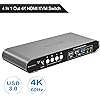
4 Computers 1 HDMI Monitor Automatic KVM Switch 4K@60Hz, Hotkey Switching, EDID, with Audio and Microphone, Aluminum Shell with Digital Display, USB 3.0 Hub, HDR10 with Cables

  • Based on 376 reviews
Condition: New
Checking for the best price...
$109.00 Why this price?

Buy Now, Pay Later


As low as $18.17 / mo
  • – 6-month term
  • – No impact on credit
  • – Instant approval decision
  • – Secure and straightforward checkout

Ready to go? Add this product to your cart and select a plan during checkout.

Payment plans are offered through our trusted finance partners Klarna, Affirm, Afterpay, Apple Pay, and PayTomorrow. No-credit-needed leasing options through Acima may also be available at checkout.

Learn more about financing & leasing here.

Selected Option

Free shipping on this product

30-day refund/replacement

To qualify for a full refund, items must be returned in their original, unused condition. If an item is returned in a used, damaged, or materially different state, you may be granted a partial refund.

To initiate a return, please visit our Returns Center.

View our full returns policy here.


Availability: 17 left in stock
Fulfilled by Amazon

Arrives Saturday, Dec 20
Order within 12 hours and 27 minutes
Available payment plans shown during checkout

Protection Plan Protect Your Purchase
Checking for protection plans...

Style: 4 Computers 1 HDMI Monitor USB 3.0


Features

  • Attention: Please plug in all the cables included in the box; the four USB cables are for the front KVM USB ports. If you don't plug into your computers, your keyboard and mouse will not work. For audio, please select [USB Audio device] as the sound output option and then connect your speakers or headphones to the audio port.
  • Aluminum Alloy Shell - We use high-quality aluminum alloy to provide our customers with an excellent premium look, great drop resistance, lightweight design, strong build, and robust corrosion resistance.
  • Digital Display- KVM Switch 4 port with a digital display which lets you easy to see the current channel even in the dark investment
  • Hotkey - Tired of a manual button switch? This product gives you a convenient way to switch with Keyboard shortcut: press the right [CTRL] key twice, then press [1, 2, 3, or 4], followed by [Enter] to choose a computer.
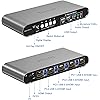
  • Four computers one HDMI monitor - Controls 4 HDMI interfaced computers or other applicable devices using one keyboard, a mouse, one monitor with audio & microphone, and USB 3.0 HUB port
  • HDMI Switch 4K - Supported resolutions: 480i, 480p, 720p, 1080i, 1080p, 2K@144Hz, 4K@60Hz RGB 4:4:4 HDR10, HDMI 2.0 compatible.Auto-Scan, auto-detection, auto EDID. Hot plug & play and HDCP. Multi-platform: support Windows 11/10/7/2000/XP/Vista, Linux, and Mac
  • KVM switch with Automatic Switching: To enable the automatic switching feature of the KVM switch, press Right [CTRL] twice, then [S], and [Enter]. The default auto-switching time is 10 seconds. (To turn it off, simply press this shortcut combination again). You can adjust the auto-switching time by pressing Right [CTRL] twice, followed by [S], then [N], and [Enter], where 'N' represents the number of seconds for the switching time (ranging from 1 to 999 seconds).

Brand: Terived


Hardware Interface: USB, HDMI


Special Feature: Play, Plug


Compatible Devices: Personal Computer, Laptop, Monitor, Television


Total USB Ports: 4


Package Dimensions ‏ : ‎ 9.53 x 5.2 x 4.45 inches; 2.67 Pounds


Date First Available ‏ : ‎ March 23, 2023


Manufacturer ‏ : ‎ Terived


Best Sellers Rank: #310 in KVM Switches


Customer Reviews: 4.0 4.0 out of 5 stars 376 ratings


Frequently asked questions

If you place your order now, the estimated arrival date for this product is: Saturday, Dec 20

Yes, absolutely! You may return this product for a full refund within 30 days of receiving it.

To initiate a return, please visit our Returns Center.

View our full returns policy here.

  • Klarna Financing
  • Affirm Pay in 4
  • Affirm Financing
  • Afterpay Financing
  • PayTomorrow Financing
  • Financing through Apple Pay
Leasing options through Acima may also be available during checkout.

Learn more about financing & leasing here.

Top Amazon Reviews


  • Effortless Multi-Computer Management
Upgrade your workstation with the Terived 4 Computers 1 DP Monitor Automatic KVM Switch, the ultimate solution for seamless multi-computer management. This innovative device allows you to control up to four computers using a single display and keyboard/mouse setup, streamlining your workflow and maximizing efficiency. Discover the convenience and versatility of the Terived KVM Switch and take your productivity to the next level. Effortless Multi-Computer Control: The standout feature of the Terived KVM Switch is its ability to control up to four computers using a single DP monitor, keyboard, and mouse. With the push of a button or via automatic switching, you can easily switch between computers and access their desktops without the need for additional monitors or peripherals. Whether you're multitasking between different projects or collaborating with teammates, the Terived KVM Switch makes it easy to manage multiple computers from one central workstation. Automatic Switching: The Terived KVM Switch features automatic switching functionality, allowing you to focus on your work without interruptions. Simply set your preferred switching mode – whether it's manual, hotkey, or auto-scan – and let the KVM Switch handle the rest. When you need to switch between computers, the KVM Switch automatically detects the active input and displays it on your monitor, ensuring a seamless and uninterrupted user experience. High-Definition Display: Enjoy crystal-clear visuals and vibrant colors with the Terived KVM Switch's support for DP (DisplayPort) monitors. With its high-definition display capabilities, the KVM Switch delivers sharp and detailed images, making it ideal for graphic design, video editing, gaming, and other visually intensive tasks. Whether you're working on spreadsheets, watching videos, or editing photos, the Terived KVM Switch ensures that every pixel is rendered with precision and clarity. Plug-and-Play Setup: Setting up the Terived KVM Switch is quick and easy, requiring no additional software or drivers. Simply connect your computers and peripherals to the KVM Switch using the included cables, and you're ready to start working. The KVM Switch supports a wide range of operating systems, including Windows, macOS, and Linux, ensuring compatibility with your existing hardware and software setup. With its plug-and-play functionality, the Terived KVM Switch gets you up and running in minutes, so you can focus on what matters most – your work. Space-Saving Design: Designed with efficiency in mind, the Terived KVM Switch features a compact and space-saving design that fits seamlessly into any workstation. Its sleek and modern aesthetic complements any desktop setup, while its lightweight construction makes it easy to transport between different workstations or office locations. Whether you're working in a home office, corporate environment, or on the go, the Terived KVM Switch provides the versatility and flexibility you need to maximize your productivity. Reliable Performance: Backed by advanced technology and engineering expertise, the Terived KVM Switch delivers reliable performance and long-lasting durability. Built to withstand the demands of daily use, this KVM Switch is made from high-quality materials and undergoes rigorous testing to ensure optimal functionality and reliability. With its proven track record of performance and reliability, the Terived KVM Switch is the ideal choice for professionals who demand the best from their workstation accessories. In conclusion, the Terived 4 Computers 1 DP Monitor Automatic KVM Switch is a game-changer for anyone looking to streamline their workstation setup and maximize productivity. With its effortless multi-computer control, automatic switching functionality, high-definition display support, plug-and-play setup, space-saving design, and reliable performance, the Terived KVM Switch offers unbeatable convenience and versatility for managing multiple computers from a single workstation. Upgrade your setup with the Terived KVM Switch and experience the difference it can make in your daily workflow. ... show more
Reviewed in the United States on May 13, 2024 by KJ

  • Works as advertised, at least initially.
Style: 4 Computers 2 HDMI Monitors
The media could not be loaded. FYI, this account is my wife's amazon account. Ok, so this is a preliminary review basically immediately getting it all installed. I have three computers attached: one is a 2013 macbook m3 for work, one is a gaming pc for home/personal, and a raspberry PI 4 for hobby stuff. Mouse / keyboard attached to front panel of KVM, and in the hub port I have a display link switch. Right now only running one hdmi through the hub KVM and letting the display link handle the other monitor. The RPI is using one hdmi connect. Unit is small but well built and nice looking. Took me a little while to get all the kinks worked out. One huge gotcha is that the monitors take a while to integrate the unit the very first time so be patient. Suggest hooking things up slowly and test as you go. Also, the hdmi ports and cables are very stiff so make sure they are plugged all the way in. Some information such as a full list of shortcuts is only in the manual and not online! Switching is is a bit pokey, maybe 10 seconds or so, sometimes less, sometimes more, especially if the computer logs itself out. DisplayLink (all graphics through USB driver) isn't terrible, but it adds cpu load and display lag, is slower to switch and has other minor headaches (especialyl for mac) so ideally everything runs through the KVM hdmi. In order to do that, I need thee cables: displayport to hdmi for gaming pc (nvidia only gives one hdmi), "micro hdmi" -> hdmi for rpi, and thunderbolt -> hdmi for mac. However, it's not clear if it's necessary...I need to use it for a while. My primary monitor is on wired hdmi. Keyboard shortcuts work fine for all three o/s (linux, win, mac) with no issues. I have had no issues with displays not switching or windows repositioning after switching back. I will follow up with an extended review, but if you are WFH and looking for a reasonably priced switching solution that supports > 2 monitors, then this is probably the product for you. ... show more
Reviewed in the United States on January 14, 2025 by Shannon

  • Comes with cables, quality build, worked okay at 2K 100hz, but not 144hz (Update from seller)
Style: 2 Computers 1 DP Monitor USB 3.0
UPDATE 9/7/23: The seller contacted me. My email got lost for a few days in their spam folder. They apologized, saying they normally reply immediately. They offered to send me a replacement unit, and they also offered to pre-test it at 4K@144Hz. Additionally they said if I continued having a problem, it could be interference and they offered to a free DP signal repeater to see if that would help. I had already returned the unit to Amazon, but I would have accepted their offer if I had received the email before then. Added one star for the excellent response, and as I point out below, this is a well built, quality unit. --- Original review: This is a quality product. Metal case, well built, it comes with all, the cables (two 5ft USB 3.0 and three 5ft DisplayPort 1.4). It also comes with a power supply. I really wanted this to work, but while it worked perfectly at 2K 100hz, the monitor would blink at 144hz. I emailed the manufacturer for suggestions, but they never replied (THEY DID, CORRECTED ABOVE). It may just be my monitor being fussy. Your mileage may vary. Sadly I sent it back for a refund. I can honestly say that as long as you don't need to go over 100hz refresh (or are willing to at least try it at 144Hz, as monitors vary), this is an excellent product. I liked that there was a hotkey option, but you could also disable it. I can also confirm this KVM works with Corsair RGB keyboards BUT, as recommended in the FAQ, you need to plug the keyboard into the USB 3.0 jack for the RGB to work. I wound up using a simple A-B DisplayPort switch made by GiantMatrix and sold here on Amazon. It did work at 144hz, with 5ft cables, and that suits me fine as I really don't need to switch the keyboard and mouse. ... show more
Reviewed in the United States on September 5, 2023 by Robert Osorio

Can't find a product?

Find it on Amazon first, then paste the link below.
Checking for best price...